How to Test a UPS Battery – Runtime, Load & Health Checks
UPS batteries wear out long before the electronics do. Testing your UPS battery ensures it can actually keep your PC, NAS, or networking gear running during an outage. This guide gives you a clean, step‑by‑step method to test a UPS battery using real‑world load tests, built‑in diagnostics, and runtime checks.
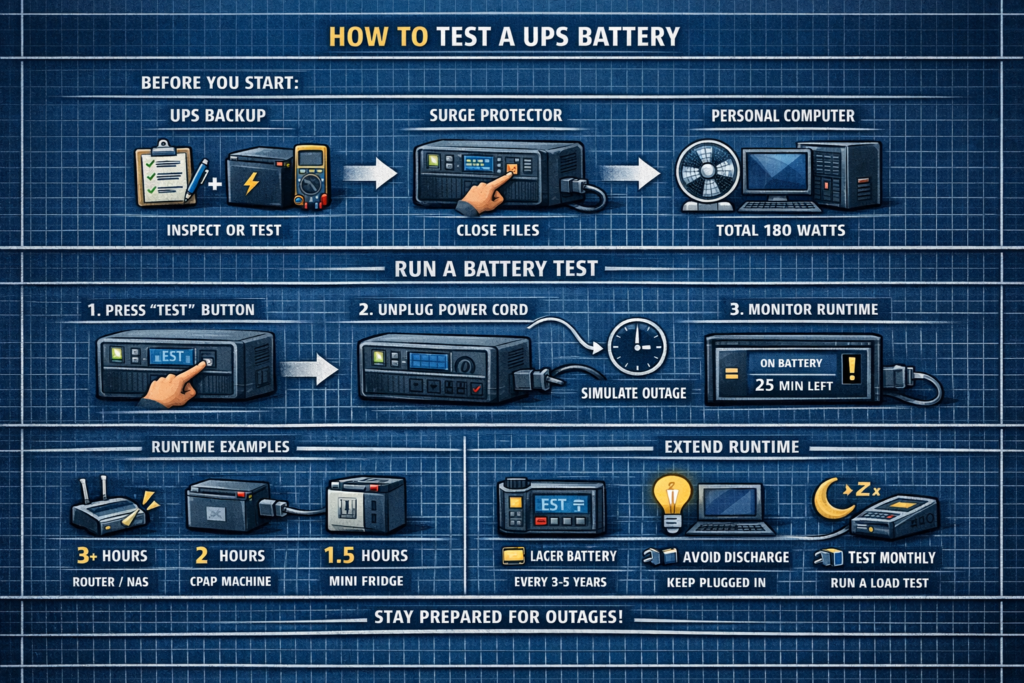
1. Run the Built‑In UPS Self‑Test
Most UPS units (APC, CyberPower, Eaton) include a built‑in self‑test that checks battery voltage and internal resistance.
How to run it:
- Press and hold the UPS “Test” or “Power” button (varies by model)
- Or run the test from the UPS software on your PC
- Wait for the UPS to click and briefly switch to battery
Pass: UPS returns to AC power with no alarms Fail: UPS beeps, flashes “Replace Battery,” or logs an error
2. Perform a Real‑World Runtime Test (Most Accurate)
This is the gold‑standard UPS battery test.
- Plug in your normal devices (PC, monitor, NAS, router)
- Fully charge the UPS battery
- Unplug the UPS from the wall
- Start a timer
- Let the UPS run until it hits low‑battery shutdown
Compare the runtime to the UPS’s expected runtime chart.
| UPS Size | Expected Runtime @ 50% Load |
|---|---|
| 600VA | 5–10 minutes |
| 1000VA | 8–15 minutes |
| 1500VA | 10–20 minutes |
If your UPS dies in half the expected time, the battery is worn out.
3. Test the UPS Under a Controlled Load
If you want a consistent test, use a predictable load like:
- A desk lamp with an LED or incandescent bulb
- A small fan
- A known‑wattage device (Kill A Watt meter helps)
Example:
- 100W lamp
- UPS battery: 300Wh
Expected runtime ≈ 300Wh ÷ 100W ÷ 1.25 ≈ 2.4 hours
If you only get 30–60 minutes, the battery is failing.
4. Check Battery Age and Replacement Interval
Most UPS batteries last:
- 2–3 years for budget UPS units
- 3–5 years for mid‑range UPS units
- 5+ years for high‑end online UPS units
If your UPS battery is older than 3 years, reduced runtime is normal.
5. Inspect for Physical Battery Problems
Unplug the UPS and remove the battery cover.
Signs of a failing battery:
- Swollen or bulging battery casing
- Corrosion on terminals
- Leaking electrolyte
- Battery feels unusually warm
If you see any of these, replace the battery immediately.
6. Use UPS Software to Check Battery Health
Most UPS brands offer free monitoring software that shows:
- Battery charge percentage
- Estimated runtime
- Load percentage
- Battery health or “Replace Battery” warnings
- Event logs (brownouts, self‑test failures)
If the software reports “Replace Battery,” trust it.
7. When to Replace a UPS Battery
- Runtime is less than 50% of original
- UPS fails self‑tests
- Battery is older than 3–5 years
- Battery is swollen or leaking
- UPS shuts off instantly during outages
Most UPS units use standard, user‑replaceable sealed lead‑acid batteries.
Quick UPS Battery Testing Checklist
- Run built‑in self‑test
- Perform a real runtime test
- Test with a known load
- Check battery age
- Inspect for swelling or leaks
- Review UPS software logs
FAQ: Testing a UPS Battery
How often should I test my UPS battery
Every 3–6 months is ideal.
Can I test a UPS battery with a multimeter
You can check voltage, but it won’t reveal capacity. Load tests are far more accurate.
Do UPS batteries fail suddenly
Yes—especially older SLA batteries. Regular testing prevents surprises.
Should I replace the whole UPS or just the battery
Replace the battery unless the UPS electronics are failing.
⚡ Explore More UPS & Runtime Guides
Pair battery testing with proper sizing, runtime planning, and replacement schedules.
As an Amazon Associate, we earn from qualifying purchases. This does not affect our reviews or product recommendations.