How to Connect Solar Panels to EcoFlow – Series, Parallel, and Mixed Wiring Guide
EcoFlow power stations accept solar through MC4 connectors and built‑in MPPT controllers. The key is matching your panel wiring to EcoFlow’s PV voltage range and max solar input. Once you know those limits, connecting solar panels is simple.
EcoFlow Solar Input Limits (Quick Reference)
| EcoFlow Model | Max Solar Input (W) | PV Voltage Range (V) |
|---|---|---|
| RIVER 2 / RIVER 2 Max | 110–220W | 11–30V |
| DELTA 2 | 500W | 11–60V |
| DELTA Max | 800W | 11–100V |
| DELTA Pro | 1600W | 11–150V |
| DELTA Pro Ultra | Up to 5600W | 30–150V per MPPT |
Rule: Your panel wiring must stay within the voltage window above.
Required Parts
- Solar panels with MC4 connectors
- EcoFlow MC4 → XT60 or XT60i adapter (included with most units)
- MC4 extension cables (optional)
- MC4 Y‑branch connectors (for parallel wiring)
How to Connect Solar Panels in Series (Recommended for EcoFlow)
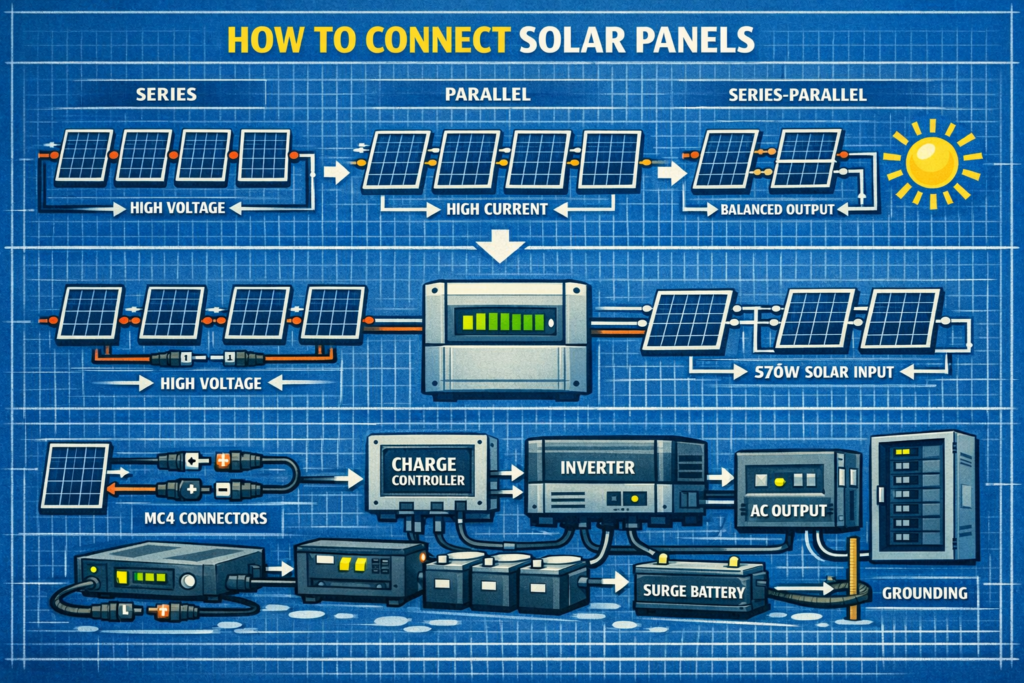
Series wiring increases voltage while keeping amperage the same. This is ideal for EcoFlow’s MPPT controllers.
How to wire in series:
- Connect Panel 1 positive (+) → Panel 2 negative (–)
- Connect Panel 2 positive (+) → Panel 3 negative (–) if applicable
- The remaining free positive and negative go to EcoFlow
Example:
| Panels | Result |
|---|---|
| 2 × 100W (18V, 5.5A) | 36V, 5.5A |
| 3 × 100W | 54V, 5.5A |
Best For: DELTA 2, DELTA Max, DELTA Pro, DELTA Pro Ultra.
How to Connect Solar Panels in Parallel (Low Voltage EcoFlow Models)
Parallel wiring keeps voltage the same but increases amperage. Use this when your EcoFlow has a low PV voltage limit.
How to wire in parallel:
- Use MC4 Y‑branch connectors
- Combine all positives together
- Combine all negatives together
- Connect combined leads to EcoFlow
Example:
| Panels | Result |
|---|---|
| 2 × 100W (18V, 5.5A) | 18V, 11A |
| 3 × 100W | 18V, 16.5A |
Best For: RIVER 2, RIVER 2 Max, older EcoFlow units with 30V limits.
How to Connect Solar Panels in Series‑Parallel (Large Arrays)
Use series‑parallel when you need more watts but must stay under EcoFlow’s voltage limit.
Example (4 × 100W panels):
- Make two series strings (36V each)
- Combine those strings in parallel (36V, 11A)
Best For: DELTA Max, DELTA Pro, DELTA Pro Ultra.
How to Connect Solar Panels to EcoFlow (Step‑by‑Step)
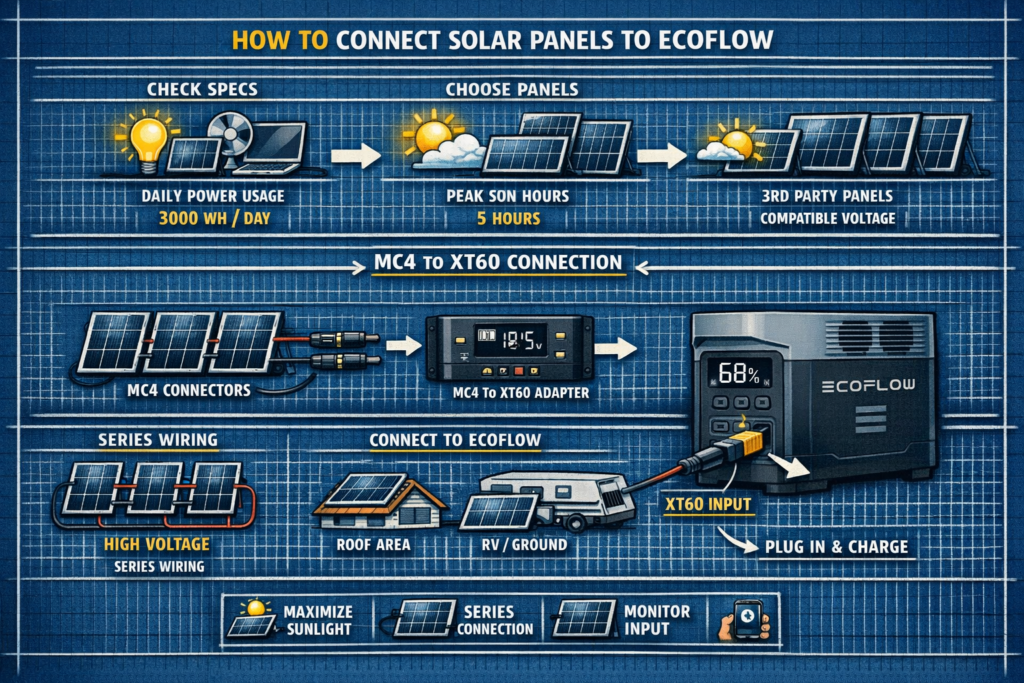
- Wire your panels in series, parallel, or series‑parallel
- Connect MC4 leads to EcoFlow’s MC4 → XT60/XT60i adapter
- Plug the adapter into the EcoFlow solar input port
- Check polarity (MC4 prevents mistakes)
- EcoFlow display will show incoming watts
EcoFlow auto‑detects solar input—no settings required.
EcoFlow Wiring Examples
Best Wiring: Series
PV Range: 11–60V
Use 2–3 × 100W panels in series.
Best Wiring: Series or Series‑Parallel
PV Range: 11–100V
Use 3–4 × 100W in series, or 2S2P for 400W+.
Best Wiring: Series
PV Range: 11–150V
Use up to 4–6 × 100W in series per MPPT.
Best Wiring: Series‑Parallel
PV Range: 30–150V per MPPT
Large arrays: 2S2P, 3S2P, 3S3P depending on wattage.
Common Mistakes When Connecting Solar to EcoFlow
- Exceeding PV voltage (the #1 way people damage units)
- Using parallel wiring when series is required
- Mixing different panels (voltage mismatch wastes power)
- Using long, thin cables (voltage drop reduces watts)
- Shading one panel in a series string (kills output)
FAQ: Connecting Solar Panels to EcoFlow
Can I mix different solar panels?
Only if voltage and current match closely. Otherwise, the array down‑rates to the weakest panel.
Can EcoFlow handle high voltage?
Yes—DELTA Max, Pro, and Ultra accept high PV voltage. RIVER models do not.
Do I need fuses?
Only for parallel strings (series wiring does not require fusing).
Can I use third‑party panels?
Yes—EcoFlow works with any MC4 solar panel as long as voltage stays in range.
🔆 Explore More Solar Wiring Guides
Pair your EcoFlow with the right wiring, angles, and panel sizing for maximum efficiency.
As an Amazon Associate, we earn from qualifying purchases. This does not affect our reviews or product recommendations.